
Freeing Up the Operation Team’s Schedule
Creating an internal tool to help operations migrate data efficiently.
Team
Project Manager, UX Designer
Role
UX Designer
Project Length
3 months
The operations team has data coming from one property management system (PMS) and needs a tool that will help them more efficiently migrate the data to new and existing PMS sources.
A Sneak Peak
The operations team needed a tool and I delivered. The ‘Source Migration’ tool enables the operations team to migrate PMS data quickly and efficiently, freeing up hours in their day to day tasks.
It’s estimated that this tool
saves the Technical Account Manager and Support System Manager a combined 10 hours a week.
allowed the Support System Manager to train a less tech savvy team to delegate her duties, freeing up more time in her schedule.
enables the Technical Account Manager to troubleshoot migration issues from a UI
Where We Started
Before this tool existed, the source migration process was done completely manually in the database. And because it was a complicated and highly technical process, the Technical Account Manager and Support System Manager were the only people at Onboard (apart from Engineering) that could do this job. And it was quickly eating up a large time out of their week. So my team and I set out to build a tool that would automate this process for them and simplify the process so less technical team members could perform the migrations.
Why? Why? Why?
As a designer, I always want to know why. To create an effective solution for our operations team, I needed to understand why they needed these features and what issue they needed solved. I need to understand what they were doing and why? I set up regular meetings with our Technical Account Manager (TAM) where I could observe and do what toddlers do, pepper him with "whys" every chance I got. I observed him while he manually migrated data with his current process. I talked to him about the issues and anxieties that came from the current process. Meeting with him gave me the opportunity to learn what was happening technically. By walking in the user's shoes, I was able to better synthesize and condense the technical process into something simpler and friendlier.
Untangling a Complex Process
We all forget, so I build my process to eliminate forgetfulness. After each session with the TAM, I would build a flow from my notes to visualize what I had learned that day.
I also try to record meetings and research calls whenever possible so that a user's experience doesn't depend on 1 person's memory. Complex problems require complex solutions, and complex solutions require noticing the most minute details. I don't want my users to rely on memory to determine if those details get caught.
When I iterate, I gather feedback. After every iteration I brought my ideas back to the TAM and the Support System Manager (SSM) in low-fidelity form. Low-fidelity to ensure no one gets too bogged down in the minutiae. At the end of the day, I design for others and it's imperative I ensure that my solutions work for them as well.
I also made sure to gather feedback from the other project stakeholder, our VP of Engineering. It was important that what I was designing would work technically. He was able to give me crucial feedback and additional insights into our technical constraints.
Flows built from conversations with stakeholders
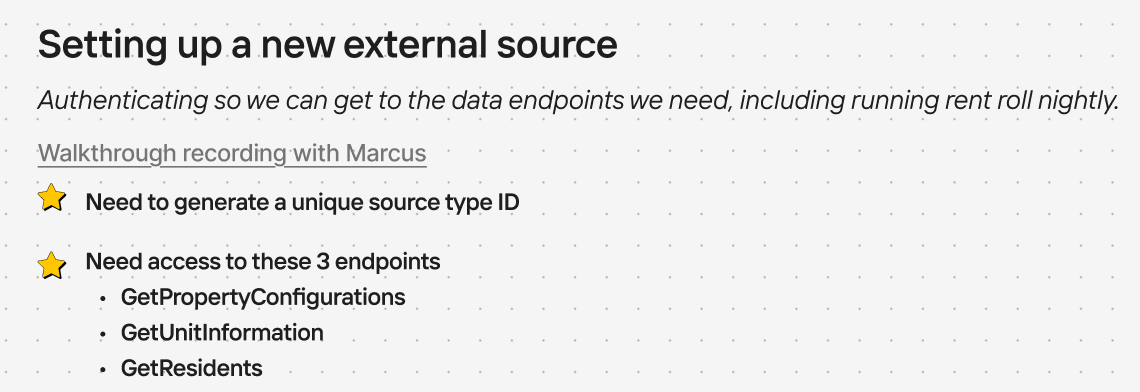
The existing user flow for setting up a new migration source in the database.


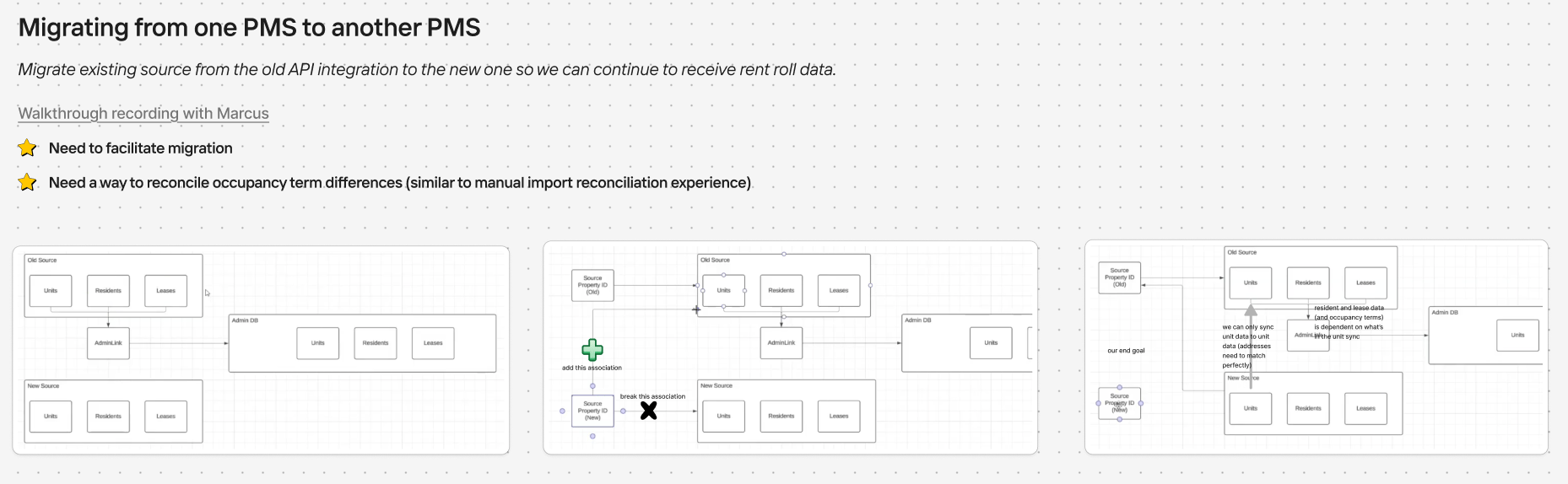
The existing user flow for migrating data to an existing source in the database.
Better understanding the technical jobs that our TAM and SSM were performing helped me to identify which problems the experience would need to solve.
Users ‘jobs to be done’.
Embedding myself in our operations team work also allowed me to synthesize the user’s journey and map them out.
Users journey map for migrating sources.
Creating an Interface
Initial wireframes of the migration tool.
Low fidelity wireframes of the migration tool.
The Migration Tool in All it’s Glory
Initiating a migration
Matching data
Reviewing a migration
A principle I like to follow when designing is to design experiences that do the heavy lifting so the user doesn’t have to. This migration tool does just that for our users. It frees up hours of time each week for our Technical Account Manager and Support System Manager by automating their very manual process. And the tool is simple enough that our Support System Manager was able to delegate her migration work to her team, freeing up more time in her day.
A Portal Residents Actually Want to Use
User Research
Mobile Design
Conservice

Previous
Internal App Makeover
Information architecture
User Testing
Conservice
Next

Niccole Mumford
Milwaukee + Remote Designer
Freeing Up the Operation Team’s Schedule
Creating an internal tool to help operations migrate data efficiently.
Team
Product Manager, UX Designer, Technical Account Manager, System Support Manager, VP of Engineering
Role
UX Designer
Project Length
3 months
The operations team has data coming from one property management system (PMS) and needs a tool that will help them more efficiently migrate the data to new and existing PMS sources.
A Sneak Peak
The operations team needed a tool and I delivered. The ‘Source Migration’ tool enables the operations team to migrate PMS data quickly and efficiently, freeing up hours in their day to day tasks.
It’s estimated that this tool
saves the Technical Account Manager and Support System Manager a combined 10 hours a week.
allowed the Support System Manager to train a less tech savvy team to delegate her duties, freeing up more time in her schedule.
enables the Technical Account Manager to troubleshoot migration issues from a UI
Where We Started
Before this tool existed, the source migration process was done completely manually in the database. And because it was a complicated and highly technical process, the Technical Account Manager and Support System Manager were the only people at Onboard (apart from Engineering) that could do this job. And it was quickly eating up a large time out of their week. So my team and I set out to build a tool that would automate this process for them and simplify the process so less technical team members could perform the migrations.
Why? Why? Why?
As a designer, I always want to know why. To create an effective solution for our operations team, I needed to understand why they needed these features and what issue they needed solved. I need to understand what they were doing and why? I set up regular meetings with our Technical Account Manager (TAM) where I could observe and do what toddlers do, pepper him with "whys" every chance I got. I observed him while he manually migrated data with his current process. I talked to him about the issues and anxieties that came from the current process. Meeting with him gave me the opportunity to learn what was happening technically. By walking in the user's shoes, I was able to better synthesize and condense the technical process into something simpler and friendlier.
Untangling a Complex Process
We all forget, so I build my process to eliminate forgetfulness. After each session with the TAM, I would build a flow from my notes to visualize what I had learned that day.
I also try to record meetings and research calls whenever possible so that a user's experience doesn't depend on 1 person's memory. Complex problems require complex solutions, and complex solutions require noticing the most minute details. I don't want my users to rely on memory to determine if those details get caught.
When I iterate, I gather feedback. After every iteration I brought my ideas back to the TAM and the Support System Manager (SSM) in low-fidelity form. Low-fidelity to ensure no one gets too bogged down in the minutiae. At the end of the day, I design for others and it's imperative I ensure that my solutions work for them as well.
I also made sure to gather feedback from the other project stakeholder, our VP of Engineering. It was important that what I was designing would work technically. He was able to give me crucial feedback and additional insights into our technical constraints.
Flows built from conversations with stakeholders
The existing user flow for setting up a new migration source in the database.
The existing user flow for migrating data to an existing source in the database.
Better understanding the technical jobs that our TAM and SSM were performing helped me to identify which problems the experience would need to solve.
Users ‘jobs to be done’.
Embedding myself in our operations team work also allowed me to synthesize the user’s journey and map them out.
Users journey map for migrating sources.
Creating an Interface
Initial wireframes of the migration tool.
Low fidelity wireframes of the migration tool.
The Migration Tool in All it’s Glory
Initiating a migration
Matching data
Reviewing a migration
A principle I like to follow when designing is to design experiences that do the heavy lifting so the user doesn’t have to. This migration tool does just that for our users. It frees up hours of time each week for our Technical Account Manager and Support System Manager by automating their very manual process. And the tool is simple enough that our Support System Manager was able to delegate her migration work to her team, freeing up more time in her day.
A Portal Residents Actually Want to Use
User Research
Mobile Design
Previous project
Conservice
Internal App Makeover
Information architecture
User Testing
Conservice
Next Project
Niccole Mumford
Milwaukee + Remote Designer