
A Portal Residents Actually Want to Use
Redesigning a customer portal to drive usage and decrease costs.
Team
Project Manager, UX Designer
Role
UX Designer
Project Length
8 months+
Users of Onboard’s resident portal aren’t fully utilizing the portal and, instead, are calling in to support. Decreased support agents call volume by discovering self-service opportunities while improving the overall user experience.
What Are We Working With?
Current functionality
Because this was a new product to me, I familiarized myself with the current resident portal. What can residents do in the portal? What is the resident’s journey?
How refactoring factors in? ;)
Our development team was going to rewrite our internal application and our resident portal. This replatforming work is what initiated a portal redesign in the first place. So I also needed to know how the portal was technically designed and what limitations we would carry with us to the new platform.
New corporate overlord
And because we were recently acquired, I also wanted to understand what Conservice’s client portal looked like and what services they were offering their clients? Would we be able to take advantage of any of their features or would they be purely aspirational?
Competitive analysis
Lastly, I wanted to understand what other resident portals looked like. What are the industry standards? What are our competitors doing?
Understanding Our User
When starting with the portal dashboard I realized designing a dashboard that included all of the necessary content as it was today with a fresher interface might not improve it’s usabilty or drive more resident usage. So I listed out what we knew about our users and what I wanted to know to inform my designs.
I originally wanted to survey our residents about their experience using the portal. But after learning that we weren’t tracking visits to the portal, I wouldn’t be able to reach out to those residents. However, we were tracking residents as they created their portal account so I could use those cohorts of residents to research with. And because I wouldn’t be able to know how often they were visiting the portal I would need to restructure the questions I wanted to ask to only ask about their portal account creation and what hopes and expectations they had for their portal.
I also wanted to talk to internal resident support agents who heard directly from residents because they would be familiar with what issues residents ran into and what they needed help doing that they weren’t able to do in their portal. From there I created a research plan that I determined would consist of three different segments.
1
Surveying residents
2
Testing initial designs with resident support agents to understand the usability
3
Moderated user testing with those same resident support agents and an external panel of people
Research plan where I realized this would take more than one segment to best answer my questions.
A Mobile-First Portal
While we weren’t tracking visits to the portal, we were able to see what devices were being used to access our portal. And the greater majority of users are using a mobile device. So my first big ah-hah moment was realizing that I would need to design the resident portal as mobile first.
I also learned that resident portal usage wasn’t as dismal as we had assumed. After creating their portal account, 38% of respondents did return back to the portal. It was a pleasant surprise to learn that residents were using the portal after all!
Results from first segment of research.
Discovering the reasons residents were returning to their portal helped me decide what should be most prominent in the portal dashboard designs. Those reasons were:
1
For help setting up their internet
2
To view internet package details
3
To contact customer service

One of my big questions I had for resident support agents was the layout of the portal. I had two different layout designs to test and I hoped to narrow down the direction I would take.
Layout 1:
VS.
Layout 2:
The two different layouts tested during the second segment of research.
Layout 1 tested better in my user test and was also the preferred layout by testing participants. Resident support agents preferred that design for a few different reasons.
More user friendly for elderly residents
Simple design preferred for less tech-savvy residents
One page design allowed users to search using ‘Control’ + ‘F’
Results from second segment of research.

Doing moderated user tests with resident support agents and our external panel gave me additional valuable insights that propelled my designs forward.
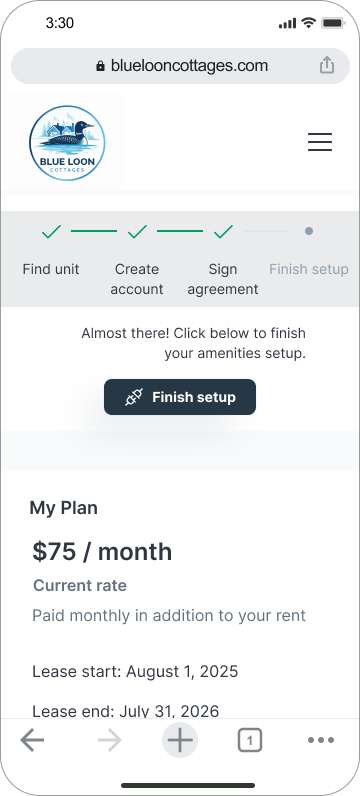
I learned that participants were looking for some kind of checklist in the portal. They want direction on what tasks they have to complete before they can access their internet. Because the designs didn’t include anything like that, participants were incorrectly relying on the navigational elements. I knew one of the biggest changes I would make would be to add a stepper to the portal so residents would know if they had any remaining tasks and had clear direction to complete them.
Newly added stepper to help the resident know where they are at in their setup process.
During our testing it stood out to me how many participants got caught up on the word “cancellation”. The copy wasn’t effectively conveying an incentive we offer, in fact, participants were seeing it and misunderstanding the incentive even after reading all of the copy. So I wanted to get rid of the word “cancellation” all together and replace it with words that better convey the incentive being offered.
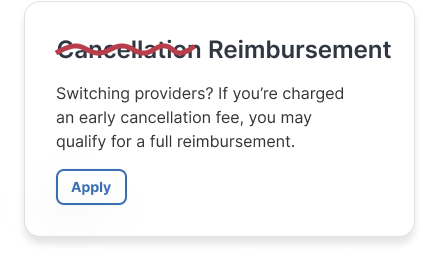

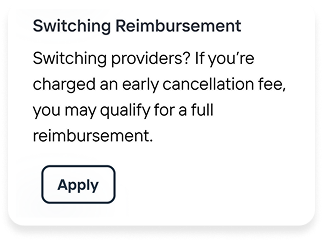
A small change of product copy can make a world of difference to our users.
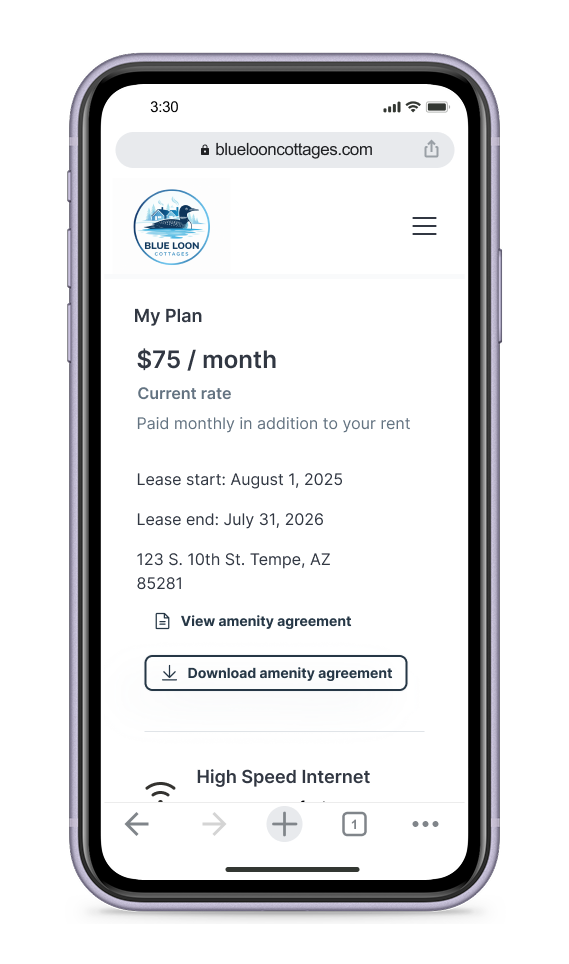
Lastly, I learned that the overall feel and design of the portal was “too marketing-y”, giving participants the impression that they were still shopping for internet services even though they are already in a contract and receiving services from Onboard. I hoped to change this perception in my final design by changing the copy to reflect that a contract had already started. I replaced the “Upgrades available” section with and “Upgrades” button, signifying that the user can take that action because they’re already receiving services. I also added the lease start and end dates to show the current contract terms.
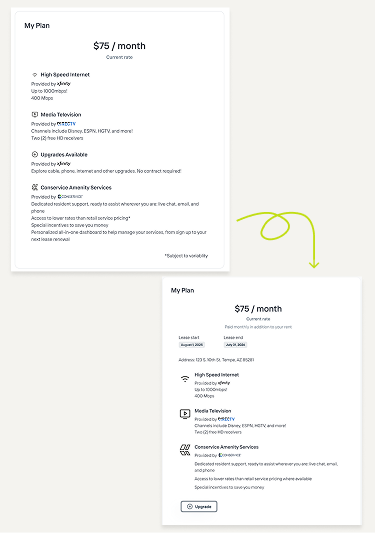
Changes in the “My Plan” section to make it feel more like a customer portal and less like a marketing website.
Self-Service Opportunities
Identifying self-service opportunities in the resident portal was going to help me meet my goal of driving down resident call volume. My research discovered a few opportunities.
One recurring piece of feedback from resident support agents was the ability for residents to apply for incentives in the portal. This functionality exists already, but this feature seems hidden in the portal because not all support agents knew it existed. I wanted to call attention to these incentive opportunities in the portal. The new portal will also give residents the ability to check the status of their applications after applying, hopefully driving down the need for residents to call in even more.
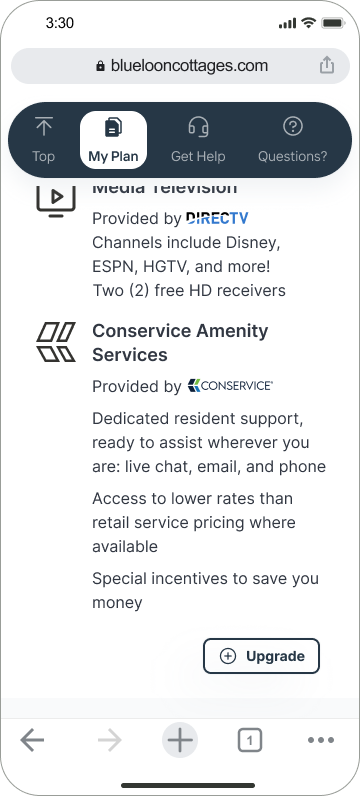
Something that came up regularly in each research segment was visibility into upgrading services. During the moderated testing sessions I observed participants attempt to click on the ‘upgrade’ section. Resident support agents also brought this up in their user test responses. So I knew I wanted to make this a prominent feature in the portal.
Added ‘Upgrade’ button to allow residents to upgrade their services from their portal.
Other opportunities discovered during research were:
improving the clarity of setup instructions so residents are able to finish setting up services without calling in
giving residents the ability to see their network credentials in the portal
providing a link for residents to email support (which can be answered more efficiently than phone calls) and
giving residents the ability to troubleshoot internet issues from within the portal
Final Designs
The overall design of the resident portal didn’t change drastically. But with small, intentional changes I was able to improve the user experience and increase the value offered for residents. While it’s too early to measure the redesigns impact on call volume, I’m optimistic residents will be more empowered from the new portal.
Marrying Canopy’s Product for a Synergized Experience
Complex Systems
Information architecture
Canopy

Previous
Freeing Up the Operation Team’s Schedule
Complex Systems
Collaboration
Conservice
Next

Niccole Mumford
Milwaukee + Remote Designer
A Portal Residents Actually Want to Use
Redesigning a customer portal to drive usage and decrease costs.

Find unit
Create account
Sign agreement

Finish setup
Almost there! Click below to finish your amenities setup.

Finish setup
My Plan
$75 / month
Current rate
Paid monthly in addition to your rent
Lease start: August 1, 2025
Lease end: July 31, 2026
123 S. 10th St. Tempe, AZ 85281

View amenity agreement

Download amenity agreement

High Speed Internet
Provided by

Up to 1000mbps!
400 Mbps

Media Television
Provided by

Channels include Disney, ESPN, HGTV, and more!
Two (2) free HD receivers

Conservice Amenity Services
Provided by
Dedicated resident support, ready to assist wherever you are: live chat, email, and phone
Access to lower rates than retail service pricing where available
Special incentives to save you money

Upgrade
Increase Your Savings
Price Match Request
If you currently pay less for similar services, you may be able to temporarily match your rate.
Apply
Cost Switching Reimbursement
Switching providers? If you’re charged an early cancellation fee, you may qualify for a full reimbursement.
Apply
FAQs
How do I set up billing?

The provider is no longer able to bill tenants directly and requires account holders to set up payment through a verified billing and customer support platform. Create an account and you’ll have access to set up billing details.
What’s included?

How do I get started?
Are there any hidden fees?
Can I upgrade or add services to my account?
How am I charged for these services?
I have other questions who do I talk to?

1


figma.com


3:30


Find unit
Create account
Sign agreement
Finish setup
Almost there! Click below to finish your amenities setup.
Finish setup
Need help?
We’re here to help!
Chat with us 24 hours / 7 days a week
Start chat
Call us Monday - Sunday 7 am - 10 pm ET at +1 (636) 538-5449.
Prefer email? You can also contact us at info@letsonboard.com

Send email
Increase Your Savings
Price Match Request
If you currently pay less for similar services, you may be able to temporarily match your rate.
Apply
Cost Switching Reimbursement
Switching providers? If you’re charged an early cancellation fee, you may qualify for a full reimbursement.
Apply
My Plan
$75 / month
Current rate
Paid monthly in addition to your rent
Lease start: August 1, 2025
Lease end: July 31, 2026
123 S. 10th St. Tempe, AZ 85281
View amenity agreement
Download amenity agreement
High Speed Internet
Provided by
Up to 1000mbps!
400 Mbps
Media Television
Provided by
Channels include Disney, ESPN, HGTV, and more!
Two (2) free HD receivers
Conservice Amenity Services
Provided by
Dedicated resident support, ready to assist wherever you are: live chat, email, and phone
Access to lower rates than retail service pricing where available
Special incentives to save you money
Upgrade
FAQs
How do I set up billing?
The provider is no longer able to bill tenants directly and requires account holders to set up payment through a verified billing and customer support platform. Create an account and you’ll have access to set up billing details.
What’s included?
How do I get started?
Are there any hidden fees?
Can I upgrade or add services to my account?
How am I charged for these services?
I have other questions who do I talk to?
1
bluelooncottages.com
3:30
Team
Product Manager, UX Designer
Role
UX Designer
Project Length
8 months+
Users of Onboard’s resident portal aren’t fully utilizing the portal and, instead, are calling in to support. Decreased support agents call volume by discovering self-service opportunities while improving the overall user experience.
What Are We Working With?
Current functionality
Because this was a new product to me, I familiarized myself with the current resident portal. What can residents do in the portal? What is the resident’s journey?
How refactoring factors in? ;)
Our development team was going to rewrite our internal application and our resident portal. This replatforming work is what initiated a portal redesign in the first place. So I also needed to know how the portal was technically designed and what limitations we would carry with us to the new platform.
New corporate overlord
And because we were recently acquired, I also wanted to understand what Conservice’s client portal looked like and what services they were offering their clients? Would we be able to take advantage of any of their features or would they be purely aspirational?
Competitive analysis
Lastly, I wanted to understand what other resident portals looked like. What are the industry standards? What are our competitors doing?
Understanding Our User
When starting with the portal dashboard I realized designing a dashboard that included all of the necessary content as it was today with a fresher interface might not improve it’s usabilty or drive more resident usage. So I listed out what we knew about our users and what I wanted to know to inform my designs.
I originally wanted to survey our residents about their experience using the portal. But after learning that we weren’t tracking visits to the portal, I wouldn’t be able to reach out to those residents. However, we were tracking residents as they created their portal account so I could use those cohorts of residents to research with. And because I wouldn’t be able to know how often they were visiting the portal I would need to restructure the questions I wanted to ask to only ask about their portal account creation and what hopes and expectations they had for their portal.
I also wanted to talk to internal resident support agents who heard directly from residents because they would be familiar with what issues residents ran into and what they needed help doing that they weren’t able to do in their portal. From there I created a research plan that I determined would consist of three different segments.
1
Surveying residents
2
Testing initial designs with resident support agents to understand the usability
3
Moderated user testing with those same resident support agents and an external panel of people
Research plan where I realized this would take more than one segment to best answer my questions.
A Mobile-First Portal
While we weren’t tracking visits to the portal, we were able to see what devices were being used to access our portal. And the greater majority of users are using a mobile device. So my first big ah-hah moment was realizing that I would need to design the resident portal as mobile first.
I also learned that resident portal usage wasn’t as dismal as we had assumed. After creating their portal account, 38% of respondents did return back to the portal. It was a pleasant surprise to learn that residents were using the portal after all!
Results from first segment of research.
Discovering the reasons residents were returning to their portal helped me decide what should be most prominent in the portal dashboard designs. Those reasons were:
1
For help setting up their internet
2
To view internet package details
3
To contact customer service
One of my big questions I had for resident support agents was the layout of the portal. I had two different layout designs to test and I hoped to narrow down the direction I would take.
Layout 1:
VS.
Layout 2:
The two different layouts tested during the second segment of research.
Layout 1 tested better in my user test and was also the preferred layout by testing participants. Resident support agents preferred that design for a few different reasons.
More user friendly for elderly residents
Simple design preferred for less tech-savvy residents
One page design allowed users to search using ‘Control’ + ‘F’
Results from second segment of research.
Doing moderated user tests with resident support agents and our external panel gave me additional valuable insights that propelled my designs forward.
I learned that participants were looking for some kind of checklist in the portal. They want direction on what tasks they have to complete before they can access their internet. Because the designs didn’t include anything like that, participants were incorrectly relying on the navigational elements. I knew one of the biggest changes I would make would be to add a stepper to the portal so residents would know if they had any remaining tasks and had clear direction to complete them.
Newly added stepper to help the resident know where they are at in their setup process.
During our testing it stood out to me how many participants got caught up on the word “cancellation”. The copy wasn’t effectively conveying an incentive we offer, in fact, participants were seeing it and misunderstanding the incentive even after reading all of the copy. So I wanted to get rid of the word “cancellation” all together and replace it with words that better convey the incentive being offered.
Switching providers? If you’re charged an early cancellation fee, you may qualify for a full reimbursement.
Apply
Reimbursement
Cancellation


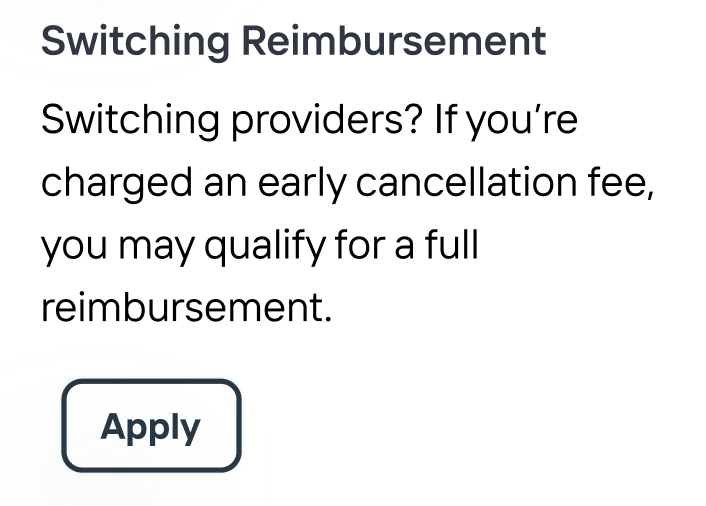
A small change of product copy can make a world of difference to our users.
Lastly, I learned that the overall feel and design of the portal was “too marketing-y”, giving participants the impression that they were still shopping for internet services even though they are already in a contract and receiving services from Onboard. I hoped to change this perception in my final design by changing the copy to reflect that a contract had already started. I replaced the “Upgrades available” section with and “Upgrades” button, signifying that the user can take that action because they’re already receiving services. I also added the lease start and end dates to show the current contract terms.

Changes in the “My Plan” section to make it feel more like a customer portal and less like a marketing website.
Self-Service Opportunities
Identifying self-service opportunities in the resident portal was going to help me meet my goal of driving down resident call volume. My research discovered a few opportunities.
One recurring piece of feedback from resident support agents was the ability for residents to apply for incentives in the portal. This functionality exists already, but this feature seems hidden in the portal because not all support agents knew it existed. I wanted to call attention to these incentive opportunities in the portal. The new portal will also give residents the ability to check the status of their applications after applying, hopefully driving down the need for residents to call in even more.
Something that came up regularly in each research segment was visibility into upgrading services. During the moderated testing sessions I observed participants attempt to click on the ‘upgrade’ section. Resident support agents also brought this up in their user test responses. So I knew I wanted to make this a prominent feature in the portal.
Added ‘Upgrade’ button to allow residents to upgrade their services from their portal.
Other opportunities discovered during research were:
improving the clarity of setup instructions so residents are able to finish setting up services without calling in
giving residents the ability to see their network credentials in the portal
providing a link for residents to email support (which can be answered more efficiently than phone calls) and
giving residents the ability to troubleshoot internet issues from within the portal
Final Designs
The overall design of the resident portal didn’t change drastically. But with small, intentional changes I was able to improve the user experience and increase the value offered for residents. While it’s too early to measure the redesigns impact on call volume, I’m optimistic residents will be more empowered from the new portal.
Find unit
Create account
Sign agreement
Finish setup
Almost there! Click below to finish your amenities setup.
Finish setup
My Plan
$75 / month
Current rate
Paid monthly in addition to your rent
Lease start: August 1, 2025
Lease end: July 31, 2026
123 S. 10th St. Tempe, AZ 85281
View amenity agreement
Download amenity agreement
High Speed Internet
Provided by
Up to 1000mbps!
400 Mbps
Media Television
Provided by
Channels include Disney, ESPN, HGTV, and more!
Two (2) free HD receivers
Conservice Amenity Services
Provided by
Dedicated resident support, ready to assist wherever you are: live chat, email, and phone
Access to lower rates than retail service pricing where available
Special incentives to save you money
Upgrade
Increase Your Savings
Price Match Request
If you currently pay less for similar services, you may be able to temporarily match your rate.
Apply
Cost Switching Reimbursement
Switching providers? If you’re charged an early cancellation fee, you may qualify for a full reimbursement.
Apply
FAQs
How do I set up billing?
The provider is no longer able to bill tenants directly and requires account holders to set up payment through a verified billing and customer support platform. Create an account and you’ll have access to set up billing details.
What’s included?
How do I get started?
Are there any hidden fees?
Can I upgrade or add services to my account?
How am I charged for these services?
I have other questions who do I talk to?
1
bluelooncottages.com
3:30
Find unit
Create account
Sign agreement
Finish setup
Almost there! Click below to finish your amenities setup.
Finish setup
Need help?
We’re here to help!
Chat with us 24 hours / 7 days a week
Start chat
Call us Monday - Sunday 7 am - 10 pm ET at +1 (636) 538-5449.
Prefer email? You can also contact us at info@letsonboard.com
Send email
Increase Your Savings
Price Match Request
If you currently pay less for similar services, you may be able to temporarily match your rate.
Apply
Cost Switching Reimbursement
Switching providers? If you’re charged an early cancellation fee, you may qualify for a full reimbursement.
Apply
My Plan
$75 / month
Current rate
Paid monthly in addition to your rent
Lease start: August 1, 2025
Lease end: July 31, 2026
123 S. 10th St. Tempe, AZ 85281
View amenity agreement
Download amenity agreement
High Speed Internet
Provided by
Up to 1000mbps!
400 Mbps
Media Television
Provided by
Channels include Disney, ESPN, HGTV, and more!
Two (2) free HD receivers
Conservice Amenity Services
Provided by
Dedicated resident support, ready to assist wherever you are: live chat, email, and phone
Access to lower rates than retail service pricing where available
Special incentives to save you money
Upgrade
FAQs
How do I set up billing?
The provider is no longer able to bill tenants directly and requires account holders to set up payment through a verified billing and customer support platform. Create an account and you’ll have access to set up billing details.
What’s included?
How do I get started?
Are there any hidden fees?
Can I upgrade or add services to my account?
How am I charged for these services?
I have other questions who do I talk to?
1
bluelooncottages.com
3:30

Top

My Plan

Get Help

Questions?
Marrying Canopy’s Product for a Synergized Experience
Complex Systems
Information architecture
Previous project
Canopy
Freeing Up the Operation Team’s Schedule
Complex Systems
Collaboration
Conservice
Next Project
Niccole Mumford
Milwaukee + Remote Designer